Imran Al Mamun
Best Gaming Keyboard for Laptop Ultimate 2026
Gaming on a high-end laptop offers incredible freedom, but relying entirely on the built-in chiclet keyboard can severely limit your performance. Integrated laptop keyboards suffer from shallow key travel, easily overheat during long gaming sessions, and lack anti-ghosting technology, which causes dropped inputs when pressing multiple keys simultaneously.
Adding a dedicated external gaming keyboard completely changes your setup. It provides tactile precision, instant response times, and an ergonomic typing angle, while keeping your hands away from your laptop's hot chassis.
Because laptop users prioritize portability, desk space, and flexible connectivity, a massive desktop keyboard isn't practical. This structural guide highlights the absolute best gaming keyboards for laptops, detailing crucial layout options, connection modes, and hardware features to optimize your mobile battle station.
Technical Features: What Laptop Gamers Need to Check
Choosing the right keyboard for a laptop setup requires balancing physical size with high-performance specs.
1. Form Factor and Layout Efficiency
Desk space is at a premium when gaming on a laptop. Standard full-size keyboards (100% layout) force your mouse hand too far to the right, straining your shoulder. Focus your search on compact form factors:
-
75% / Tenkeyless (TKL): Drops the number pad but keeps the essential function row and arrow keys.
-
65% Layout: Removes the function row but retains dedicated arrow keys, offering a perfect balance of size and utility.
-
60% Mini Layout: The ultimate space-saver. It eliminates everything except the core alphanumeric block, giving your mouse maximum room for fast swipes.
2. Connection Flexibility (Tri-Mode)
A great laptop gaming keyboard should offer three connection methods. Look for keyboards that feature Tri-Mode Connectivity: a wired USB-C connection for zero-latency charging, a high-speed 2.4GHz wireless USB dongle for competitive gaming, and Bluetooth for easy switching to your tablet or work phone.
3. Switch Design: Standard vs. Low-Profile
Traditional mechanical switches offer satisfying key travel but add significant height and weight to your bag. If you travel frequently, Low-Profile Mechanical Keyboards are a game-changer. They use ultra-thin switches and keycaps to deliver mechanical precision while sitting nearly flush with your desk, fitting easily into a standard laptop sleeve.
+-----------------------------------+-----------------------------------+
| Keyboard Layout Classification    | Best Used For                     |
+-----------------------------------+-----------------------------------+
| 75% / Tenkeyless (TKL)            | Balanced Strategy & Everyday Work |
| 65% Form Factor                   | Fast-Paced Action & Tight Desks   |
| 60% Ultra-Compact                 | Competitive FPS & Minimal Travel  |
| Low-Profile Mechanical            | Maximum Portability & Slim Bags   |
+-----------------------------------+-----------------------------------+
The Best Gaming Keyboards for Laptops
The following models stand out as top-tier choices for laptop gaming setups, combining premium performance with highly mobile designs.
1. Asus ROG Falchion RX Low Profile — Best Low-Profile Option
-
Form Factor: 65% Compact Layout
-
Switches: ROG RX Low-Profile Optical Switches
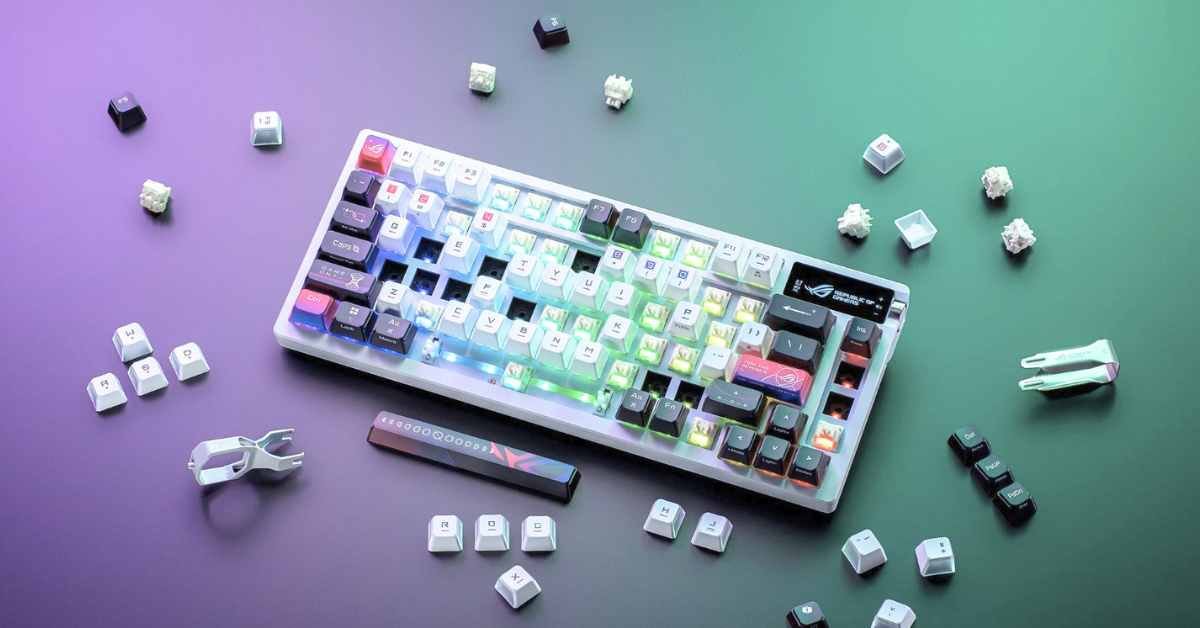
The Asus ROG Falchion RX Low Profile is a masterclass in mobile gaming hardware. At a fraction of the thickness of a standard mechanical deck, this ultra-slim keyboard features pre-lubricated optical switches that use light beams to register keypresses instantly. It includes a smart protective cover case to shield your keys from damage inside a backpack, and a hidden interactive touch panel on the rear edge for quick volume adjustments. With tri-mode wireless tech and structural sound-dampening foam, it provides a premium, travel-friendly typing experience.
2. Wooting 80HE — Best for Competitive Esports
-
Form Factor: Expanded TKL Layout
-
Switches: Lekker Linear Magnetic (Hall Effect)
If your laptop setup is built for high-level competitive shooters like Valorant, Apex Legends, or Counter-Strike, the Wooting 80HE is the ultimate performance tool. It features state-of-the-art Hall Effect magnetic switches that track the exact physical position of the key rather than a single digital click.
This unlocks Rapid Trigger technology, allowing a key to reset the instant your finger starts moving up. You can stop counter-strafing and change directions instantly, giving you a massive mechanical advantage. Managed through a clean, web-based configuration utility, it completely avoids system-bloating software downloads.
3. Keychron K3 Max — Best Budget-Friendly Wireless Option
-
Form Factor: 75% Layout
-
Switches: Gateron Low-Profile 2.0 (Hot-Swappable)
The Keychron K3 Max is a versatile, highly affordable low-profile solution that easily transitions between intense gaming and long typing sessions. Measuring just 16.5mm thick, it features a sturdy aluminum frame and an integrated layout toggle switch to change button layouts between macOS and Windows instantly.
Crucially, the K3 Max features a hot-swappable PCB, allowing you to pull out and replace the low-profile switches without touch-up soldering. Its high-speed 2.4GHz wireless connection delivers near-wired response times, making it a fantastic addition to any laptop backpack.
+-----------------------------------+-------------------+-----------------------------------+
| Premium Keyboard Model            | Key Switch Type   | Standout Feature Value            |
+-----------------------------------+-------------------+-----------------------------------+
| Asus ROG Falchion RX Low Profile  | Thin Optical      | Protective Travel Cover & Slim Fit|
| Wooting 80HE                      | Magnetic (HE)     | Rapid Trigger & Custom Actuation  |
| Keychron K3 Max                   | Low-Profile Mech  | Hot-Swap PCB & Seamless Mac Mode  |
| Corsair K70 RGB Pro Mini          | Full Mechanical   | 8,000Hz Polling & 60% Size Frame  |
+-----------------------------------+-------------------+-----------------------------------+
Pro Tips to Optimize Your Laptop Gaming Setup
To maximize your gaming performance while protecting your laptop's battery life, implement these practical configuration strategies:
-
Manage Custom RGB Lighting Brightness: Running complex, animated RGB backlighting patterns at full brightness across a 2.4GHz wireless link can drain a compact keyboard’s battery in less than two days. Turning down the brightness to 30% or choosing a solid static color can extend your battery life to hundreds of hours on a single charge.
-
Match Wireless Dongles to High-Speed Ports: For competitive gaming, always plug your high-speed 2.4GHz wireless USB receiver directly into your laptop's dedicated USB 3.2 or Type-C port rather than a basic, unpowered multi-device hub. This prevents signal interference and guarantees a true, lag-free 1,000Hz polling rate.
-
Keep a Compact USB-C Cable in Your Bag: Even if you prefer a wireless desktop setup, keep a short, high-quality braided USB-C cable in your laptop case. If your battery drops low during a match, plugging directly into your laptop switches the keyboard to a high-speed wired mode and charges the device simultaneously without interrupting your game.









- 32 megapixel camera new phone Tecno Spark 10 Pro
- AI in Bangladesh: Unlocking Potential Amid Challenges
- Google Bard now in Bangladesh
- Samsung Galaxy A54 5G: A perfect price fit!
- Refreshing only increases the speed of the computer?
- Elon Musk`s SpaceX hires 14-year-old Bangladeshi-American Kairan
- Emerging Tech Innovations 2025: The Future is Here
- Tottering from Twitter to Threads
- How Afraid Should We Be of Artificial Intelligence?
- Spotify tests voice translation feature for podcasts